Prepare App
New Trio Builders
Create the Trio App Group
If you already have a Trio App Group
- You can skip this step - your existing App Groups are found at this link: App Group List
- If your
Trio App Groupwas created from a Mac with Xcode, you may choose to edit the Description to make the NAME match
If you do not have a Trio App Group:
- Go to Register an App Group on the Apple developer site and use the table below to help you create one.
- Replace
TEAMIDwith your Apple Developer ID.
| NAME | Xcode version (NAME) | IDENTIFIER |
|---|---|---|
| Trio App Group | group org nightscout TEAMID trio trio-app-group | group.org.nightscout.TEAMID.trio.trio-app-group |
Table of Identifiers
These are the Identifiers created by running the GitHub action "Add Identifiers". Only 3 of them need to have the Trio App Group added. The Trio Identifier also needs the Time Sensitive Notifications capability enabled manually.
| NAME | Xcode version (NAME) | IDENTIFIER |
|---|---|---|
| Trio | XC org nightscout TEAMID trio | org.nightscout.TEAMID.trio |
| Trio LiveActivity | - | org.nightscout.TEAMID.trio.LiveActivity |
| Trio Watch App | XC IDENTIFIER | org.nightscout.TEAMID.trio.watchkitapp |
| Trio Watch Complication | XC IDENTIFIER | org.nightscout.TEAMID.trio.watchkitapp.TrioWatchComplication |
Add Trio App Group to Identifiers
- Open the App IDs Identifier page for your Apple Developer Account.
- Click on the
TrioIdentifier and assign theTrio App Groupto the Identifier - see graphic below.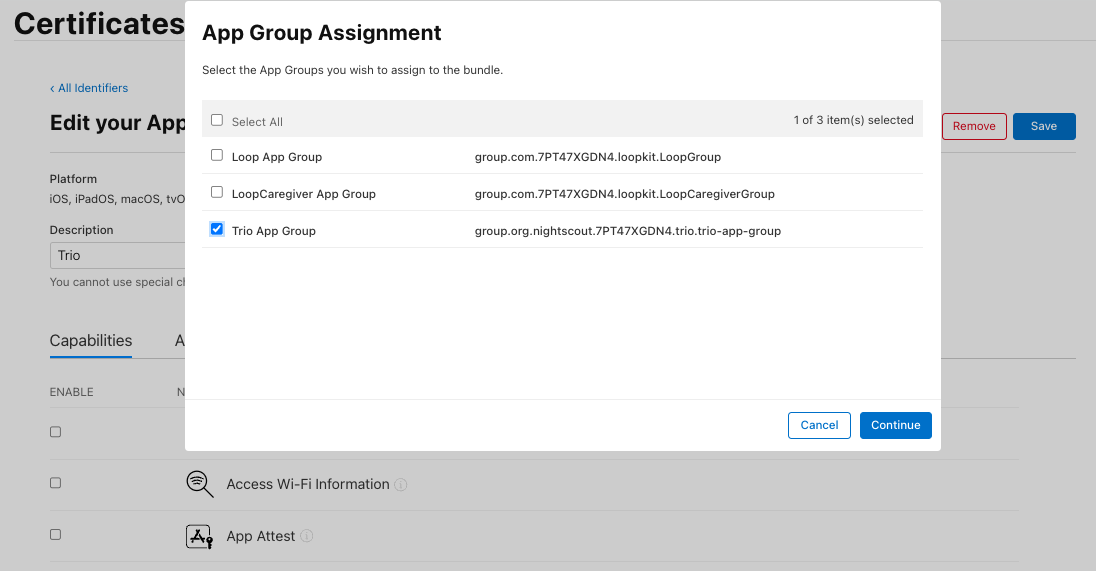
- Before saving the
TrioIdentifier, Enable Time Sensitive Notifications as described in the next section - Repeat the App Group assignment for the other 2
Identifiersthat need to have an App Group assigned:Trio Watch AppandTrio Watch Complication
- Click on the
Enable Time Sensitive Notifications
There is one difference for the Trio Identifier compared to the other Identifiers. You must manually enable the Time Sensitive Notifications capability.
While editing the Trio Identifier to add the Trio App Group, keep scrolling down until you see Time Sensitive Notifications. Make sure that check box is enabled, as shown in the graphic below. Then tap Save.
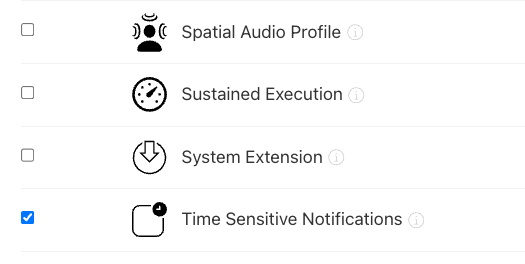
This capability is only required for the Trio Identifier - you do not need to enable it for the other Identifiers.
Configure Trio App
Follow the directions in LoopDocs, but use the Trio Bundle ID
- In
App Store Connect, theBundle IDfor Trio will be:org.nightscout.TEAMID.trio
If you want to take it a step at a time, continue to Create Certificates.
If you are feeling confident, you can go straight to Build App which includes the create certificates step.
Navigation: ← Back: Add Identifiers | Next: Prepare TestFlight Users →