Build the App
Build the App
After you run Identifiers and Prepare the App, you are ready to Build.
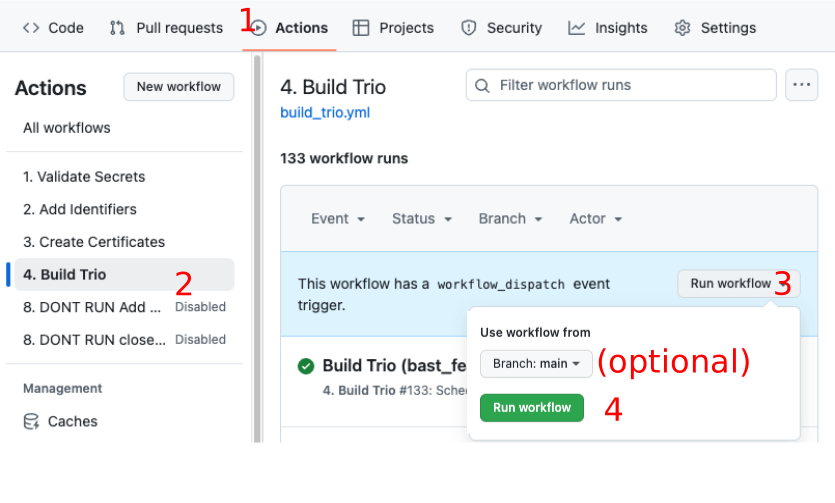
- Click on the
Actionstab of your Trio repository - On the left side, click on
4. Build Trio - On the right side, click
Run Workflowto show a dropdown menu- You will see your default branch (typically this is
main)
- You will see your default branch (typically this is
- Tap the green button that says
Run workflow.
Refresh, Do Not Repeat
Hit Refresh
After you tap the green Run workflow button, GitHub can be slow to update.
- Refresh the browser if you are unsure if the action started
- Do not start a new action until the first one completes
Disable the DO NOT RUN Actions
You may notice some GitHub actions that have DONT RUN or DO NOT RUN in their names. Those are special actions that are used by the developers. They are skipped in your Fork, but you may see logs for them that indicate they failed.
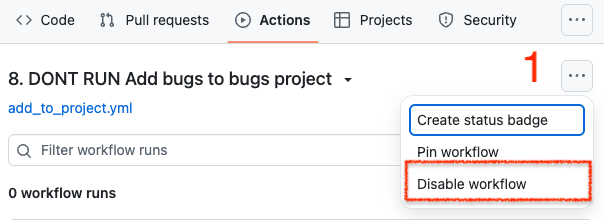
If they already have the notation disabled beside them, you won't see them run - and fail. Otherwise, click on each one, click on the three dots at the upper right, and then select Disable workflow. Then you will avoid the annoyance of seeing logs that say the action was automatically run and then skipped.
Navigation: ← Back: Prepare App | Next: Install from TestFlight →